
Remove Text from Image Online
6 one-click presets, no manual masking — 1 free no-sign-up edit every 24h.
Remove Text from Image Workbench
Your image
Choose a Cleanup Preset
Subtitles & Social CaptionsChoose a Cleanup Preset
Subtitles & Social Captions

- Cleanup Modes6 one-click presets for subtitles, camera date stamps, shop signs, handwritten notes, corner badges, or full-frame text sweep
- Free Trial & Preview1 no-sign-up trial per 24 hours plus 5 free starter credits on sign-in for in-browser previews
- Clean DownloadsPaid plans and one-time credit packs unlock original-aspect downloads with zero added watermarks
- Privacy & RefundsPrivate storage by default with automatic credit refunds if a job fails
Need to remove text from photo overlays, orange camera date stamps, or storefront signs without brushing pixel by pixel? Choose from 6 targeted cleanup presets in our browser workbench to remove text from image online free with 1 no-sign-up trial every 24 hours, or sign in for 5 free starter credits to preview real texture reconstruction before unlocking a clean original file.
Original aspect ratio, brick or wood textures, and nearby faces remain intact while text overlays disappear. Every 1K run shows its exact 3-credit cost before you click, uploads stay private in your account, and failed runs automatically refund your credits.
Compare 6 One-Click Presets Before You Remove Text from Image
Every preview below comes from the same street-side cafe photo loaded with a chalkboard sign, storefront lettering, a white subtitle bar, and an orange camera date stamp—so you can see how each mode cleans layers while keeping brick, glass, and cafe seating sharp when you remove text from picture files.

Subtitles & Social CaptionsClears white subtitle bars, story captions, and social media overlays while rebuilding pavement, clothing, and background texture cleanly underneath. 
Camera Date & TimestampsTargets retro orange or yellow corner date stamps on scanned family prints and digital camera shots without blurring foliage or table surfaces. 
Signs, Banners & LabelsLets you remove letters from image storefronts, chalkboards, and printed banners while matching wall paint, brick lines, and natural shadows. 
Handwritten Notes & MarkingsLifts pen annotations, sticky-note scribbles, and diagram labels off paper, packaging, or tabletops without smearing surrounding detail. 
Corner Badges & UI OverlaysWipes interface pills, playback icons, and corner tags from screenshots while preserving the full scene and original framing. 
Full-Frame Text SweepOne pass to erase text from photo surfaces across the entire frame—clearing signs, captions, and timestamps together when you need a completely clean backdrop.


Why Most Photo Text Remover Tools Leave Smudges, Watermarks, or Subscription Traps
People trying an ai remove text from image workflow usually hit the same three roadblocks: tedious manual brushing, blurry background patches near faces, or bait-and-switch export walls.
Skip Pixel-by-Pixel Brush Masking
Traditional browser editors force you to zoom in and paint over every letter by hand, often missing thin strokes on captions or date stamps. Our text remover image workbench replaces manual masking with 6 targeted presets that isolate subtitles, camera timestamps, shop signs, handwritten notes, or corner overlays in one click.
Rebuild Brick, Wood, and Faces Instead of Smearing
Generic erasers smear brick mortar into flat blotches or accidentally warp eyes and clothing sitting next to text. Driven by Nano Banana 2, each preset locks nearby faces and perspective while reconstructing natural grain and lighting behind cleared areas.
Honest Free Testing Without Bait-and-Switch Watermarks
Many sites promise a free text remover from image and then stamp their own logo or cap exports at 720p behind a monthly subscription. Here you can test remove text from image ai free with 1 no-sign-up trial every 24 hours plus 5 free starter credits in-browser, see the exact 3-credit cost upfront, and unlock clean original-aspect downloads via a one-time credit pack or paid plan.
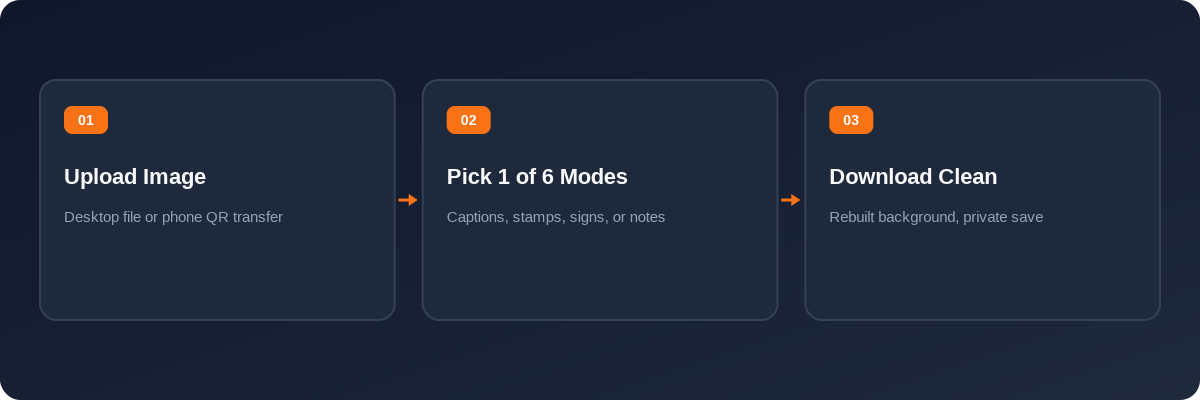
How to Remove Text from Image in 4 Fast Browser Steps
If you searched how to remove text from a picture without opening Photoshop or painting pixel masks by hand, follow four straightforward steps right in your browser.
- 1
Upload From Desktop or Scan From Your Phone
Drop in a JPG, PNG, or WebP file up to 10MB. Paid users editing on desktop can also scan a QR code to send original camera-roll shots straight from their phone without emailing files back and forth.
- 2
Pick a Targeted Cleanup Preset
Learning how to remove text from a photo takes one click here: choose Subtitles, Camera Date Stamps, Signs, Handwritten Notes, Corner Badges, or Full-Frame Sweep—no manual brush tracing needed.
- 3
Preview Real Reconstruction Before Paying to Download
Start with 1 no-sign-up trial every 24 hours or use your 5 free starter credits after sign-in to remove text from image files and inspect background grain in-browser. Every 1K run shows its 3-credit cost upfront.
- 4
Download Your Clean Original-Aspect File
Once the preview looks right, download an original-aspect image with zero added FluxDream watermarks on any active paid plan or one-time credit pack.
Real-World Photos Cleaned Without Losing Skin, Paper, or Street Texture
Match each preset to the exact overlay cluttering your file—from social screenshots and scanned family albums to travel shots and study notes.
Social Screenshots & Story Overlays
When you need to remove snapchat text from photo memories or remove caption from photo saves without cropping half the frame, the Subtitles & Social Captions preset clears text bars while keeping faces, hair, and clothing natural.
Retro Family Prints With Date Stamps
Old point-and-shoot prints often carry bright orange corner timestamps across grass, skin, or wooden tables. Pick Camera Date & Timestamps to restore original lighting and surface texture in one pass.
Travel & Product Shots With Distracting Signs
Need to remove text from jpg street photos, storefronts, or promotional banners before building a listing or slide deck? The Signs, Banners & Labels preset rebuilds brick, glass, and wall paint cleanly.
Study Notes, Diagrams & Scanned Pages
Use Handwritten Notes & Markings to erase words from picture scans, whiteboard captures, or printed handouts—leaving clean paper grain ready for reuse.
Transparent Credits, One-Time Packs, and Private Image Text Removal
Built for occasional photo fixes and daily content workflows alike—try real reconstruction first, pay only when you need clean exports, and keep personal photos off public feeds.
Preview First With Zero Subscription Lock-In
You can remove text from picture online free once every 24 hours with no account, or use 5 free starter credits after sign-in to erase text from image online free in-browser. When you only need to clean three family prints, grab a one-time credit pack instead of a recurring monthly plan—faster and far cheaper than $5–$15 manual retouching requests.
Faster One-Click Presets Over Manual Brushing
Stop spending twenty minutes outlining individual letters on a trackpad. Six focused presets let you remove text from image uploads in one pass without tracing masks.
Consistent Detail Across Complex Surfaces
When you remove text from image areas near brick walls, foliage, or portraits, Nano Banana 2 protects facial features and matches surrounding perspective so edits do not look patched.
Private Storage and Automatic Failed-Job Refunds
Every source upload and cleaned output stays private in your account by default—never published to a community gallery—and any failed image text removal run automatically refunds your credits.
Frequently Asked Questions About How to Remove Text from Image Files
Clear answers on free previews, clean downloads, portrait safety, and selective line removal before you upload.
- Can I remove text from image online free before paying?
- Yes. Visitors can test 1 no-sign-up edit every 24 hours, and new accounts receive 5 free starter credits (valid for 7 days) to preview real results in-browser. Each 1K cleanup costs 3 credits, shown upfront before you run. Clean original-aspect downloads with zero FluxDream watermarks unlock with any paid plan or one-time credit pack.
- Will cleanup blur brick backgrounds or distort faces near text?
- Each preset runs on Nano Banana 2 with subject and perspective preservation built in, so brick mortar, wood grain, eyes, and clothing next to removed letters stay sharp instead of turning into flat smudges.
- What if I want to delete text from picture areas selectively—removing one line while keeping a store sign?
- One-click presets target entire overlay categories. When you need surgical control—such as keeping a cafe name while deleting a single date or caption—open our Image to Image editor with the same credit balance and describe the exact line to remove.
- Which file formats work when I remove text from photo uploads, and are my files private?
- You can upload JPG, PNG, or WebP images up to 10MB from desktop or via phone QR upload on paid plans. Every source photo and output stays private in your account by default, never shared publicly, and failed runs automatically refund credits.
- What images am I allowed to clean with this tool?
- Only remove text from image files that you own or have permission to edit, such as personal family photos, your own screenshots, or licensed brand assets. Do not use the tool to strip third-party copyright notices.
Keep Editing With Shared Credits Across Related Photo Tools
Need more than a one-click photo text remover? Switch to any tool below using the same account balance and private history.
Ready to Remove Text from Image Files Cleanly?
Upload a photo, choose one of 6 presets, and preview real texture reconstruction in seconds before deciding on a clean download.